

Webhooks
Webhooks are the primary mechanism for receiving real-time notifications about events in your FOREN account. Since global financial operations, such as international payouts or currency conversions, are asynchronous, webhooks ensure your system is updated the moment a status changes without the need for constant polling.
Why Use Webhooks
Asynchronous financial operations, such as cross-border payouts, payment link transactions, and disbursements, complete outside your application's request-response cycle. Webhooks eliminate the need to poll for status updates by pushing event notifications to your server as they happen.
Common use cases:
- Send customer notifications when payment status changes
- Update internal records when a pending payout completes
- Trigger reconciliation workflows on transaction failures
- Log multi-currency transaction events for audit trails
Setting Up Webhooks
Configure webhook endpoints through the Fusion Dashboard:
- Log into the FOREN Dashboard
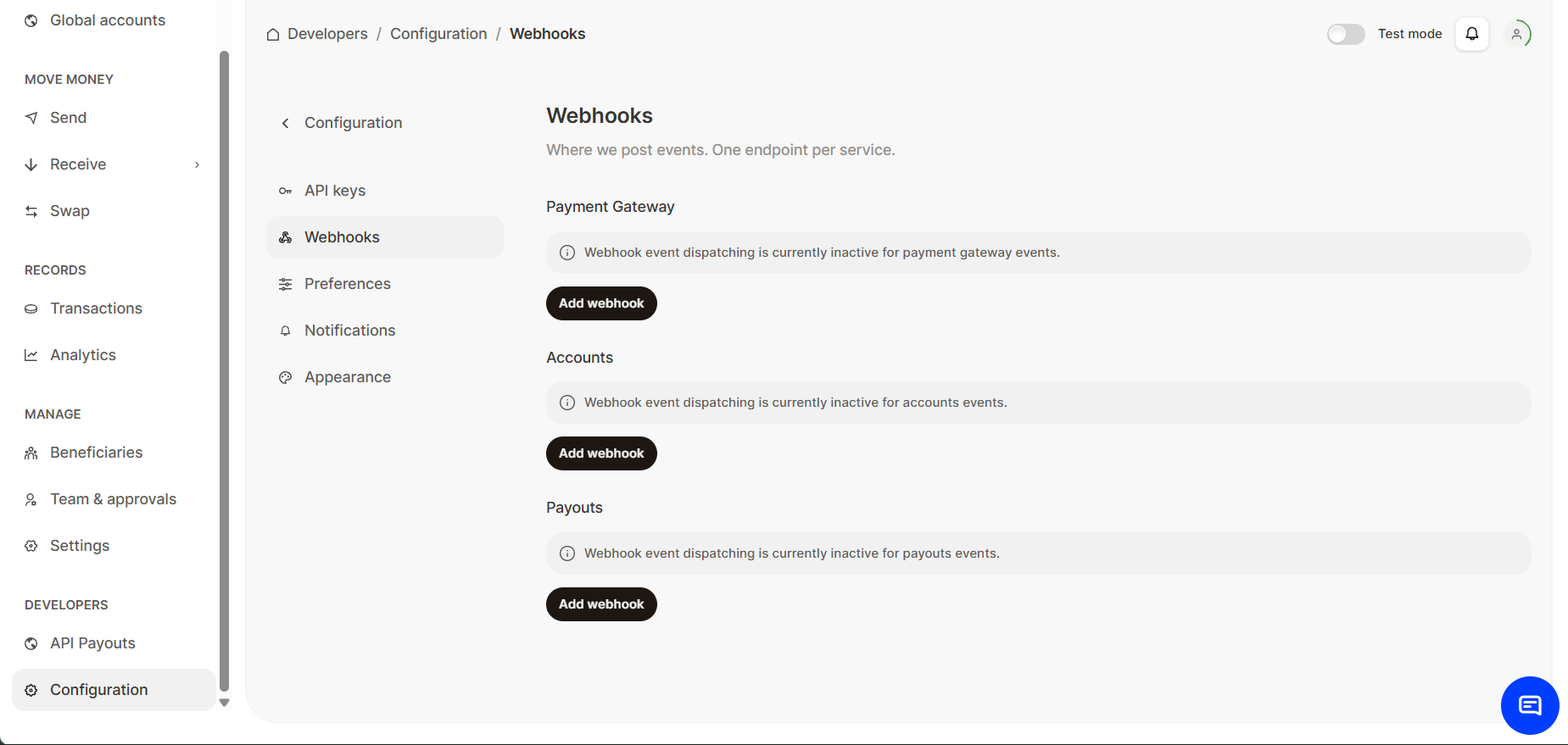
- Locate Developer Settings: On the left navigation bar, scroll to the bottom and click Configuration under the Developers section.
- Click Webhooks tab
- Click Add Webhook and enter your endpoint URL. You can add webhooks to Payment Gateway, Accounts and Payouts.
HTTPS Required
Webhook URLs must use HTTPS. HTTP endpoints will be rejected. Additionally, webhooks can only be delivered to public URLs—localhost endpoints are not supported.
Deleting Webhooks
To remove a webhook configuration:
- Log into the Dashboard
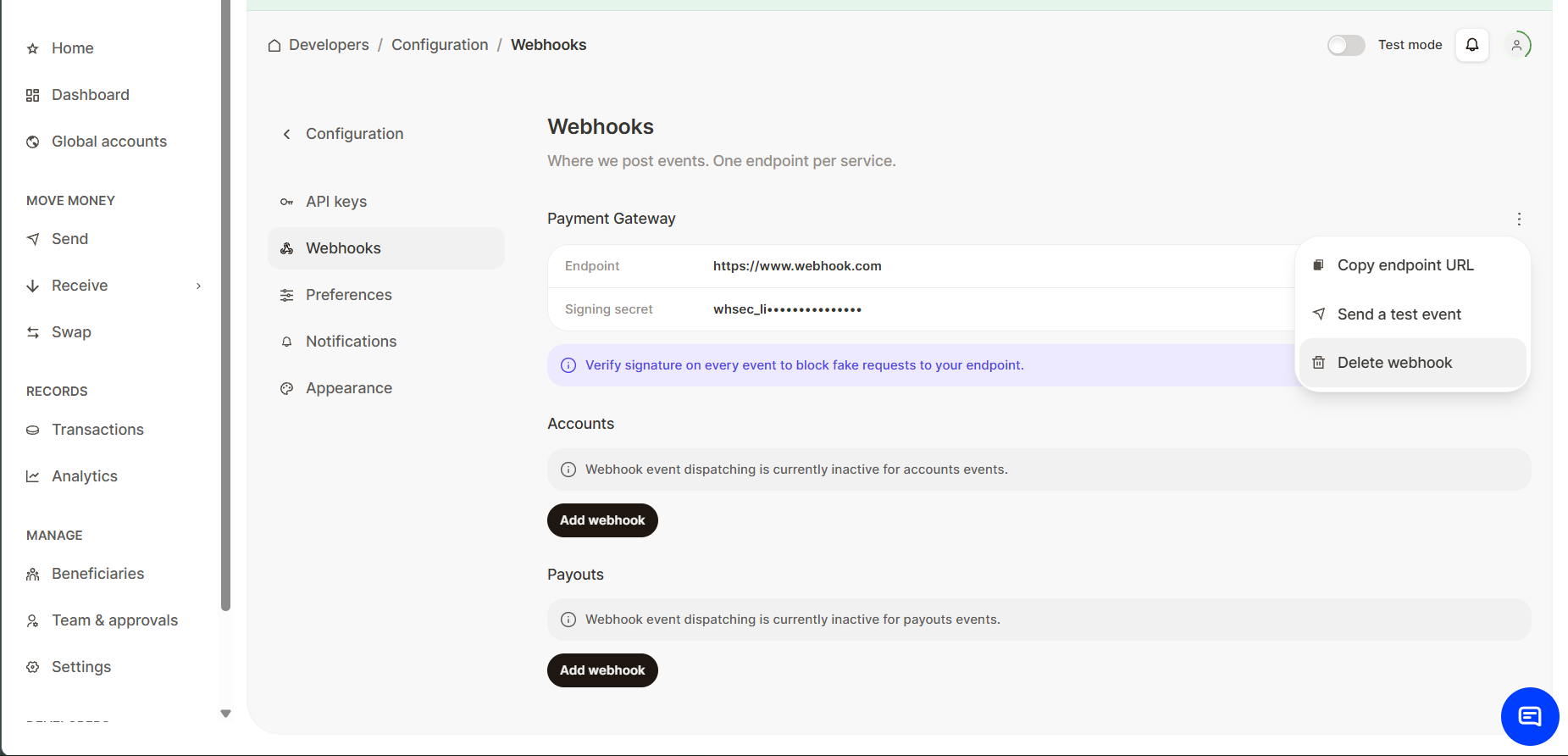
- Locate Developer Settings: On the left navigation bar, scroll to the bottom and click Configurations under the Developers section.
- Click Webhooks tab
- Click the 3 (three) dots option next to your webhook URL, then select Delete Webhook from the option.
Webhook Payload Structure
When an event occurs, FOREN sends an HTTP POST request to your configured URL with a JSON payload:
{
  "status": true,
  "event": "payment.completed",
  "data": {
    "id": "txn_abc123def456",
    "reference": "payout_ORDER123_20240115",
    "amount": 50000,
    "currency": "USD",
    "status": "completed",
    "createdAt": "2024-01-15T10:30:00Z",
    "completedAt": "2024-01-15T10:35:22Z"
  },
  "timestamp": "2024-01-15T10:35:22Z"
}Subunit Precision
All
amountfields in webhook payloads are integer subunits (e.g., 50000 = $500.00). Apply the same subunit logic you use for API responses.
Event Reference
| Category | Operation | Event Values | Key Status Field |
|---|---|---|---|
| Collections | Payment Link | PaymentSuccessful, PaymentFailed | PaymentStatus |
| Collections | Payment (API) | PaymentSuccessful, PaymentFailed | PaymentStatus |
| Disbursements | SendR | SendRSuccessful, SendRFailed | TransactionStatus |
| Disbursements | Payout | Transaction lifecycle events | FundsTransferStatus |
| Disbursements | Account | Account lifecycle events | AuthorizationStatus |
Verifying Webhook Signatures
Security is paramount when handling real-time financial data. To ensure that every webhook notification originates exclusively from FOREN and has not been tampered with in transit, we include a cryptographic signature in every request. You must verify this signature to ensure the webhook originated from FOREN.
Signature Header
The signature is sent in the LB-X-Signature header:
LB-X-Signature: A1B2C3D4E5F6...7890ABCDEFHow Signatures Are Generated
FOREN generates the signature using HMAC-SHA512:
HMAC_SHA512(<raw request body>, <your webhook secret>)The output is an uppercase hexadecimal string.
JavaScript Example
Use the function below to generate the same HMAC-SHA512 signature our webhook system creates:
async function generateHMACSHA512Hash(requestBodyString, secret) {
  const enc = new TextEncoder();
  const key = await crypto.subtle.importKey(
    "raw",
    enc.encode(secret),
    { name: "HMAC", hash: { name: "SHA-512" } },
    false,
    ["sign"]
  );
  const signature = await crypto.subtle.sign(
    "HMAC",
    key,
    enc.encode(requestBodyString)
  );
  // Convert ArrayBuffer to hex string
  const hashArray = Array.from(new Uint8Array(signature));
  const hashHex = hashArray.map(b => b.toString(16).padStart(2, '0')).join('').toUpperCase();
  return hashHex;
}
Your application should:
- Read the webhook body exactly as received
- Read
LB-X-Signaturefrom the headers - Generate its own HMAC-SHA512 signature using your secret
- Compare both values
- Accept or reject the webhook accordingly
IP Whitelisting
To enhance the security of your webhook endpoint, we recommend restricting access to only trusted FOREN webhook sources.
Configure your firewall, security group, or IP allowlist to permit inbound webhook traffic only from the following FOREN IP addresses:
- 132.220.133.49
- 20.76.7.231
FOREN will send webhook notifications exclusively from these IP addresses. Any webhook request originating from a different IP address should be treated as untrusted and must be verified before processing.
Note: IP allowlisting should be used alongside webhook signature verification to ensure the authenticity and integrity of webhook events. This provides an additional layer of protection against spoofed or malicious requests.
Best Practices
- Verify every webhook: Always validate the
LB-X-Signatureheader before processing. Reject requests with invalid or missing signatures. - Respond quickly: Return 200 OK immediately after signature verification. Process the event asynchronously to avoid timeouts.
- Implement idempotency: Use the event
idor transactionreferenceto prevent duplicate processing. Store processed event IDs in your database. - Handle all event types: Implement handlers for all event types, including future events. Log unknown events for debugging.
- Use HTTPS everywhere: Never configure HTTP webhook URLs, even in development. Use tunneling services for local testing.
- Monitor webhook failures: Track failed webhooks and implement alerting. Check the Fusion Dashboard for delivery logs and retry status.
Updated 3 days ago